Stop switching tabs. Start sketching solutions.

Visualize Algorithms Directly Over Your Code Editor

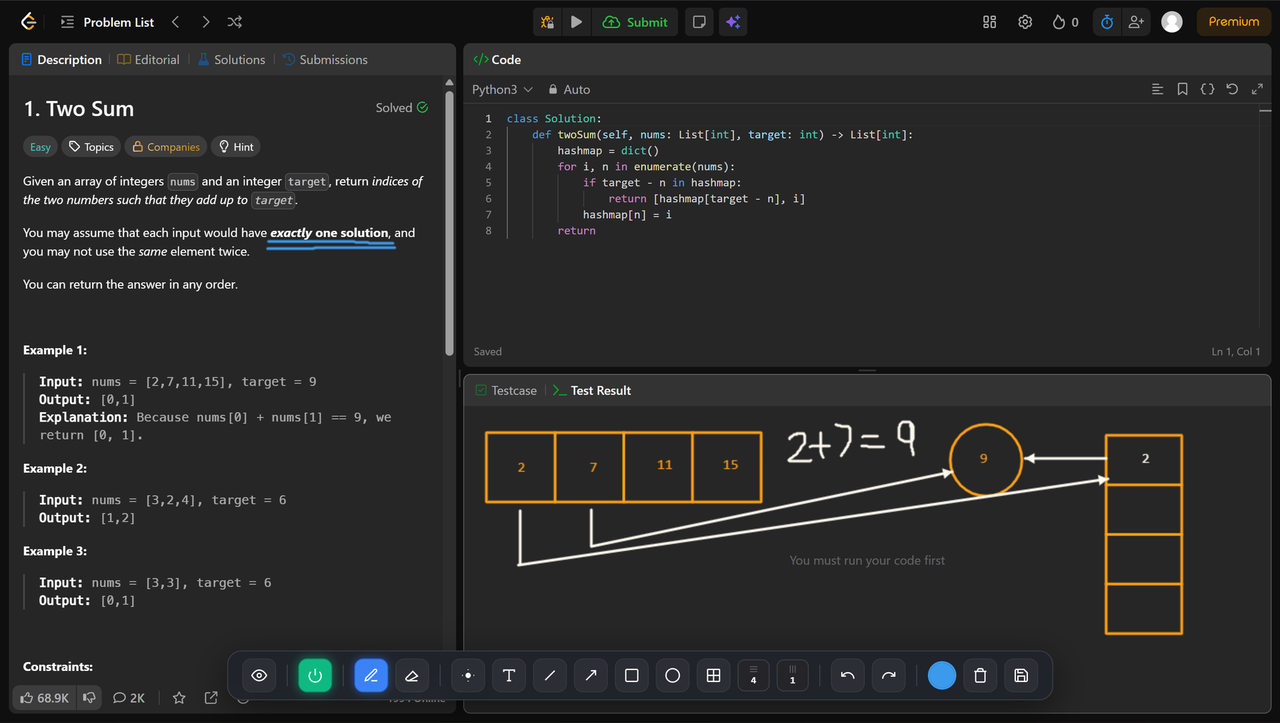
LeetDraw injects an intuitive, high-performance whiteboard canvas layer over LeetCode, CodeChef, and more. Draw trees, track pointers, and dry-run matrices smoothly.

Install Extension Star on GitHub
leetcode.com/problems/two-sum/
LeetDraw Canvas in Action
LeetCode
CodeWars
HackerRank
CodeChef

Packed with Critical Problem-Solving Tools

Every feature is optimized to map mental algorithm paths into functional canvas visualizations effortlessly.

Pen & Shapes

Freehand precision sketching for graphs, pointer paths, vectors, arrays, or basic structural connectivity tracking.

Dynamic DP Table Maker

Instantly construct custom spatial matrix grids directly underneath problems to visually parse out optimal state transitions.

Laser Pointer Tracking

Temporarily highlight executing conditional branches or recursive loops safely during high-intensity mental dry runs.

Text Inline Annotations

Drop localized typewritten logs, variables values, or complexity states safely anywhere across the page boundaries.

History State Undo/Redo

Built with robust action-history state tracking arrays, giving you full speed layout adjustments without missing beats.

Workspace Screen Save

Instantly download compiled workspace png compositions incorporating underlying problem spaces stacked perfectly with drawings.
Quick Installation Guide

Load LeetDraw locally as an unpacked extension in less than 60 seconds.

1

Clone or Download the Project

Clone the active codebase via git or extract downloaded asset archive files securely.

git clone https://github.com/yuki-sf/LeetDraw.git
2

Open Extensions Configuration Workspace

Navigate to your browser's extensions dashboard and flip the active Developer Mode tracking toggle in the upper structural bar window:

Chrome / Brave: chrome://extensions Edge: edge://extensions
3

Load Unpacked Extension Directory

Select the core source layout wrapper folder containing your project's target manifest.json document config. The application canvas toolbar layer launches on site matches automatically!